How the Day View Filter in 4ga Boards Can Improve Your Daily Workflow

Marta Nowacka
Created at: 03 Dec 2025,
Updated at: 03 Dec 2025
Staying focused during a busy workday is difficult when your board shows everything at once. The Day View Filter in 4ga Boards cuts through that noise by showing only the cards that matter today.
It's perfect for those who need to prioritize their tasks effectively e.g. any role driven by deadlines, touchpoints, and rapid task switching. The Day View Filter can be used to significantly sharpen your effectiveness.
Example: A Marketing Manager's Day
A marketing manager often juggles campaign timelines, content approvals, social posts, partner communication, and analytics updates. Without filtering, these tasks blend together, making it harder to prioritize.
With Day View enabled, your board becomes a clear agenda for the day:
- Tasks scheduled or due today surface automatically
- Follow-up reminders become actionable items rather than forgotten notes
- You can review your day at a glance and adjust workload before meetings
- Nothing unrelated to today gets in your way
Visual comparison
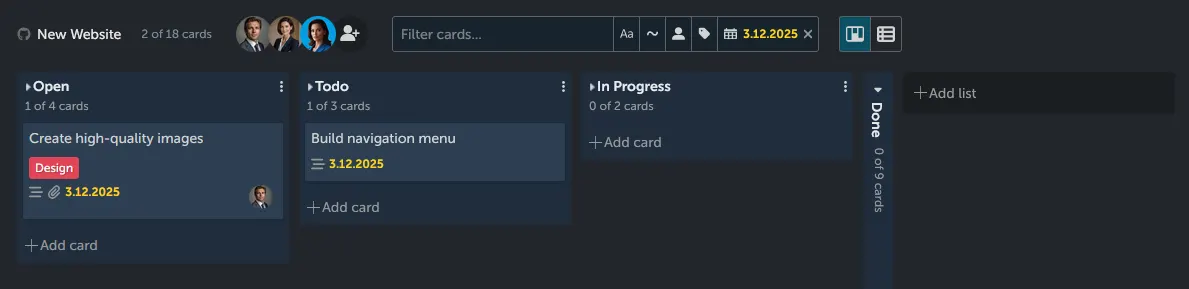
Day View Filter enabled:
Day View Filter disabled:
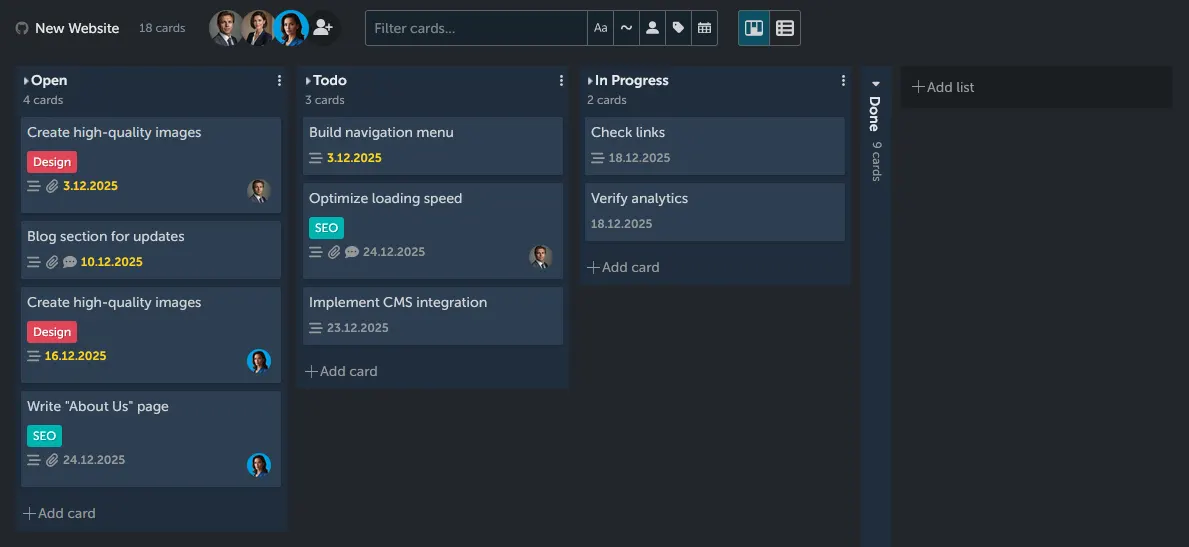
You can clearly see the difference in task visibility with Day View Filter (even in this simplified example).
Practical scenario
Instead of scrolling through dozens of campaign cards, you immediately see:
- Create high-quality images
- Build navigation menu
Now, you just know what should be done today. You can allocate time blocks, discuss during team meetings, set reminders, and track progress without distraction from other ongoing projects.
Benefits of Using Day View Filter
- Reduced Clutter: Only today's tasks are visible, minimizing distractions.
- Enhanced Focus: Concentrate on what needs to be done now, improving task completion rates.
- Better Prioritization: Quickly identify high-priority tasks without sifting through less urgent items.
- Time Management: Allocate your time effectively by seeing only what's due today.
Making Day View Your Daily Ritual
Incorporate the Day View Filter into your morning routine. Start your day by activating the filter, reviewing the tasks that need your attention, and planning your work accordingly.
This gives you a tight, realistic plan for the day. No clutter, no decision fatigue, and fewer delays. Using Day View as your morning ritual helps you stay aligned with daily priorities and keep momentum across multiple projects without losing oversight.
Gain Advantage - 4ga Boards
Because your time matters.
Interested in 4ga Boards?
Feel free to contact us
Have questions? Schedule a meeting or ask us anything!
We are waiting for your message.
